Dear Suscriber , 📚📝✨
During this final task-project, you will implement a temperature controller using an Artificial Neural Network by using the direct-inverse method.
Task Description
-
Objective: Utilize an Artificial Neural Network (ANN) to control the transistor's temperature using your TCLab kit and Arduino board.
-
Research: Google it! (or GPT it!) The basics of ANN as controllers. A great approach is to learn about the Direct Inverse Controller. You will be asked about it during the delivery session.
-
New dataset:
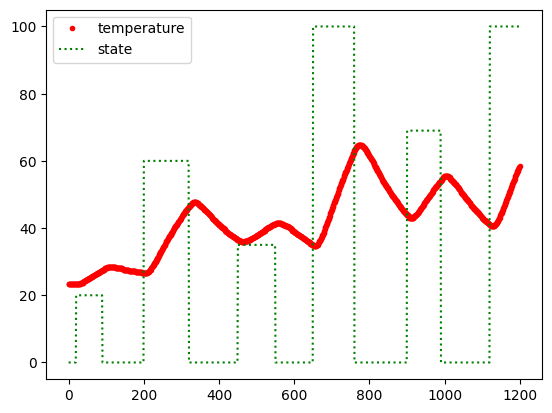
- The following code is an idea about how to collect and tag your instances; you must vary the PWM between 0 and 100, as is shown in the main image.
- Replace the
a:bsteps, for the desired initialaand finalbindex to set at a specific PWM value for Q1. - Note: Remember that temperature is a slow phenomenon; thus, you must consider giving the transistor (Q1) sufficient time to reach its final temperature during each step.
#25-minute data collection import time import numpy as np import pandas as pd n = 1500 t = np.linspace(0,n-1,n) Q = np.zeros(n); T = np.zeros(n) # to fill vectors with zeros Q[20:41]=20; Q[60:91]=00; Q[150:181]=60. # Adding the PWM values Q[a1:b1]=20; Q[a2:b2]=100; Q[a3:b3]=10 # Add more on states in the Q1 as you want... # plot data to be sure of your PWM values... # data collection from TCLab: ser = serial.Serial('/dev/cu.usbserial-10', 115200, timeout=1) time.sleep(2) for i in range(m): PWMvalue = Q[i] command = f"Q1 {PWMvalue}\n" ser.write(command.encode('ascii')) command = f"T1\n" ser.write(command.encode('ascii')) tVal = ser.readline().decode().strip() T[i] = tVal.value() time.sleep(1) if(i%10==0): print(Q[i], T[i]) PWMvalue = 0 command = f"Q1 {PWMvalue}\n" ser.write(command.encode('ascii')) ser.close() -
Explore your data: Before starting your training stage, use the following code to plot and visualize your data, and ensure your data is OK; avoid temperature data that is noisy or with slow changes (the plot from the beginning is good-collected data):
import matplotlib.pyplot as plt plt.plot(Q, '.g') plt.plot(T,'.r') plt.show() -
Save your data: If your new dataset is ok. Next, save the dataset as a CSV file for further analysis or use.
import pandas as pd data = np.column_stack((Q, T)) DF = pd.DataFrame(data, columns=['Q1', 'T1']) DF.to_csv('mydata.csv', index=False) -
Load your data: Load your data from the
CSVfile for training purposes without making modifications in case of errors:import pandas as pd # Reading data from file: try: data = pd.read_csv('data.csv') print('The data has been load and is stored in the `data` variable') except: print('Warning: Unable to load data.csv, try to run first `data-collect.ipynb`') -
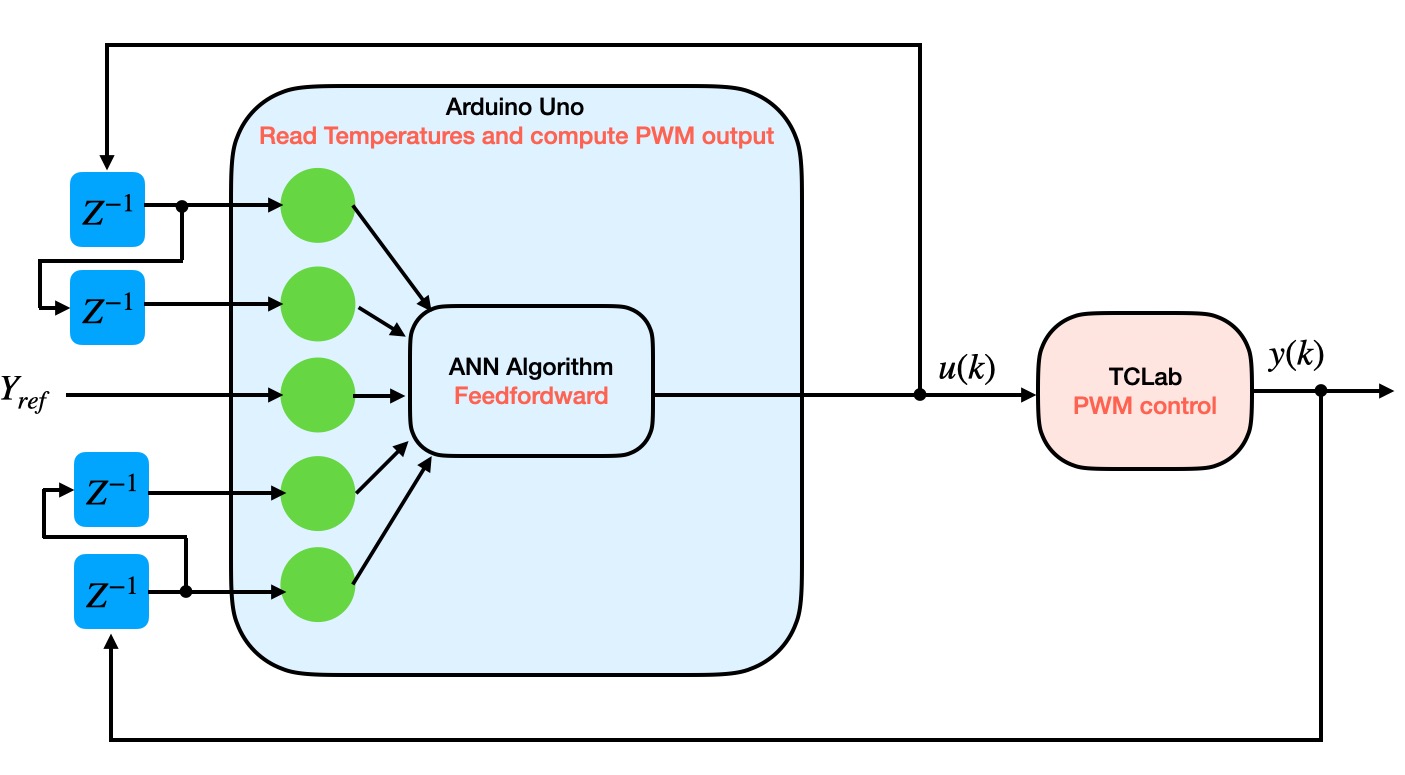
Creating the additional features and targets: Now, you have to define the controller schema considering:
- $y_{ref}$ is the desired temperature; during the training process is the future temperature $y(k+1)$.
- $y(k)$ is the transistor's actual temperature.
- $Z^{-1}$ is a one-time previous sample.
- $u(k)$ is the estimated PWM value to be written in the TCLab board; during the training process, $u(k)$ is the target PWM value at time $k$.
Thus, as a direct inverse controller, each training sample should be, for example:
xk = [T[k-1], T[k-2], Q[k-1], Q[k-2], yref]
uk = Q[k]  # target = PWM at time k
Therefore, your dataset must consider two previous temperatures, the desired final temperature, and two previous PWM values:
-
Scale the data and targets: Scale the data if necessary and verify that the data remains properly.
-
Train your model using Python: You can use an ANN model obtained from Libraries or by your own ANN class.
-
Obtain the weights and bias of the ANN: Take out the values of each neuron -weight and bias- and implement only feedforward method in the Arduino UNO board. Test the method with some dummy data and compare it with your Python implementation.
-
Develop a code for Arduino UNO: Consider the following scheme to program the Arduino UNO and TCLab attached. * In the setup function, configure a minimal schema to use the
LED,Q1, andT1-sensors and actuators-. Additionally, you can include the serial communication to follow the control performance -by printing data or using Python-. * You must define the reference or desired temperature as a variableyref. * In the loop function, read the temperature and prepare an array that includes two previous values of the PWM, two previous temperature values, and the desired temperature. Then compute the ANN’s output/PWM, write the newPWMvalue, and wait for changes.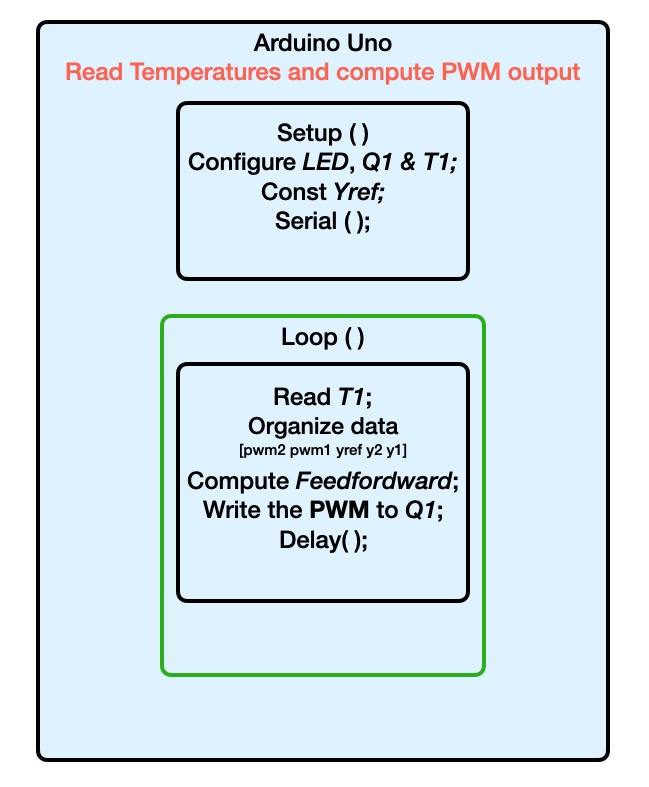
-
Define the new desired temperature and test your controller, remain alert for any issue.
-
Deadlines 📅: This session’s deadline is December 12th.
-
Sessions: Please consider using labs and lecture sessions to show any progress or get feedback by asking about any issues you experience.
-
Delivering the task 📄: This lab session does not require a report; add basic information to your Jupyter notebook file to explain what you did to make your controller work.
Happy coding!
Gerardo Marx,
Lecturer of the Artificial Intelligence and Automation Course,
gerardo.cc@morelia.tecnm.mx